How to Increase Your Typing Speed in 7 Days (Step-by-Step Guide)

Introduction
Typing fast is one of the most useful digital skills in 2025. Whether you're a student, developer, gamer, writer, or office worker, typing faster means completing tasks quicker, reducing stress, and improving productivity.
The good news?
You can improve your typing speed 10–25 WPM in just 7 days with proper technique and consistent practice.
This guide gives you a structured 7-day plan designed for beginners, intermediates, and even fast typists who want to level up.
7-Day Typing Speed Improvement Plan
Day 1: Find Your Current Typing Speed
Before you start improving, you need to measure where you stand.
Go to TypingSnap.com and check:
- WPM (Words Per Minute)
- Accuracy Percentage
- Weak Keys
- Mistyped Words
This baseline helps you track improvement clearly.
Goal for Day 1: Identify what is slowing you down—speed, accuracy, or certain keys.
Day 2: Fix Your Typing Posture
The right posture can instantly boost your speed.
Correct Typing Posture Checklist
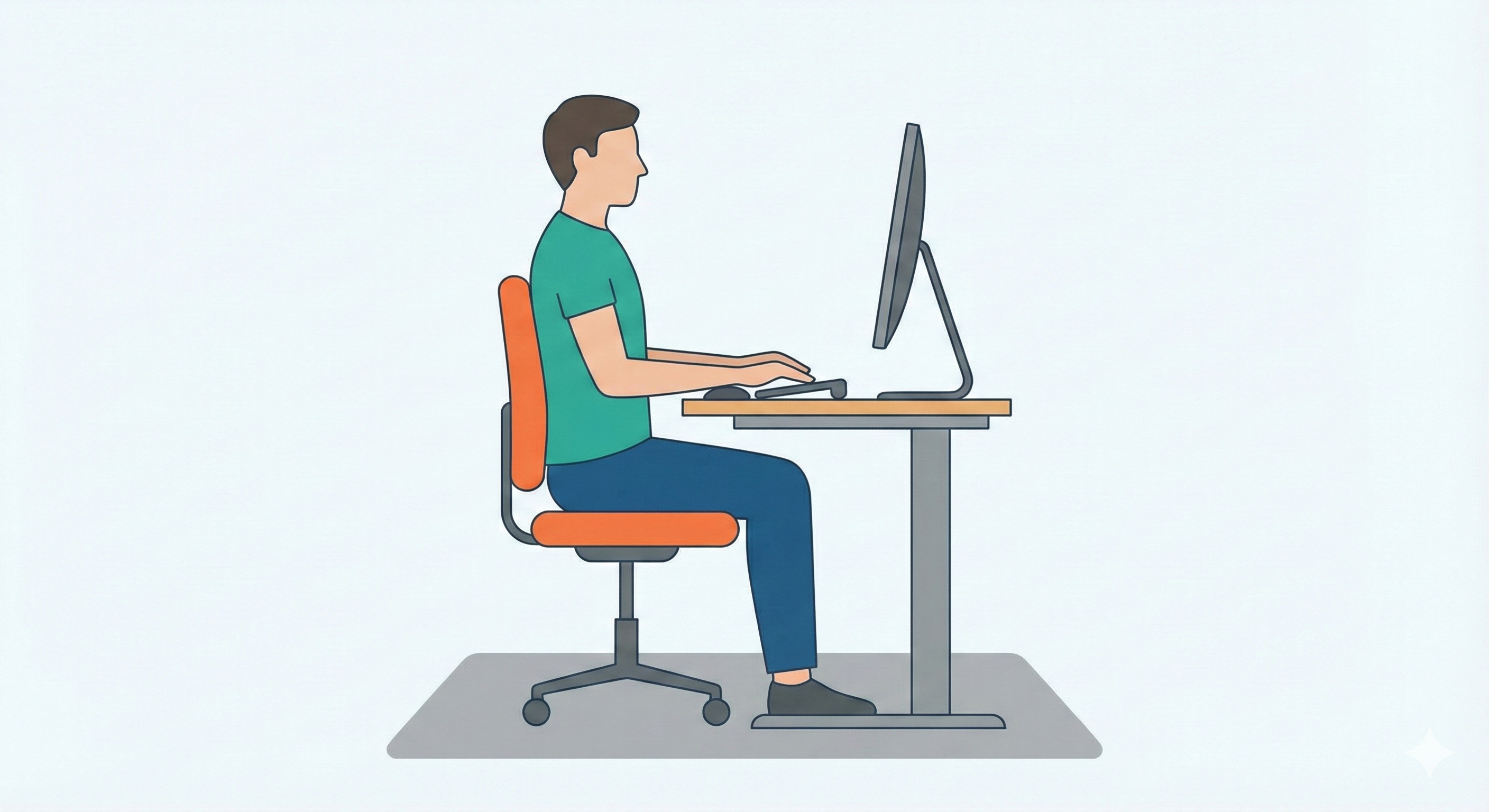
- Sit with a straight back
- Keep shoulders relaxed
- Keep elbows at 90°
- Place wrists slightly elevated
- Rest fingers lightly on the home row keys
- Keep the monitor at eye level
Good posture improves speed, accuracy, and reduces fatigue.
Goal for Day 2: Type for 10–15 minutes with correct ergonomics.
Day 3: Master the Home Row Keys
Home row is the foundation of touch typing.
The keys are:
- Left Hand: A S D F
- Right Hand: J K L ;
Each finger controls specific keys.
Practice Routine
- Hit each home row key 20–30 times
- Write small home-row words:
sad, lad, fall, ask, dad, jill, add, lad
This builds finger memory.
Goal for Day 3: Type without looking at the keyboard for simple words.
Day 4: Improve Accuracy Before Speed
Most people type fast but make too many mistakes.
Accuracy is the REAL foundation of speed.
How to Improve Accuracy
- Type slowly
- Focus on correct finger placement
- Don’t rush
- Avoid overusing backspace
- Look at the screen, not the keyboard
When accuracy improves, speed follows automatically.
Goal for Day 4: Keep accuracy above 90% in every session.
Day 5: Practice High-Frequency English Words
80% of typing tests contain repeated words like:
- the
- be
- and
- for
- with
- this
- from
- about
- that
- you
Practice these repeatedly.
Mini Exercise
Type 50–100 repetitions of:
- “the”
- “that”
- “you”
- “with”
- “from”
This gives you a huge speed advantage.
Goal for Day 5: Increase fluid typing of common words.
Day 6: Train With Real-World Text
Typing drills are useful, but real improvement comes from typing actual paragraphs.
Practice Ideas
- Type paragraphs from articles
- Type coding snippets (if you’re a developer)
- Type story passages
- Type random sentences from TypingSnap’s practice mode
This builds speed, rhythm, and comfort for long typing sessions.
Goal for Day 6: Maintain consistent typing pace for 5–10 minutes.
Day 7: Final Test + Speed Booster Tricks
Now check your new speed on TypingSnap.com and compare it with Day 1.
You’ll see an improvement if you follow the plan.
Speed Booster Tricks
- Use all 10 fingers
- Don't look at the keyboard
- Type every day for 10 minutes
- Keep wrists relaxed
- Practice hard words & symbols
- Use typing games & timed tests
With consistent practice, anyone can go from:
- 30 → 50 WPM in 1 week
- 50 → 70 WPM in 2–3 weeks
- 70+ WPM with long-term practice
Conclusion
Typing faster increases productivity, reduces work time, and makes you more efficient in every digital task.
This 7-day plan is easy to follow and guarantees improvement if you practice daily.
Start today on TypingSnap.com and track your progress!